Why RFID & QR Code Technology — The Business Case
"Zebra RFID automates data capture, reduces errors and delivers timely insights across your operations — empowering smarter, faster decision making. Track key moments across assets, inventory, employees and more to unlock efficiencies and reach your full business potential." — Zebra Technologies
This is not marketing language — it is exactly what happened when we implemented QR code and RFID asset tracking in enterprise IT operations.
Before we had a labelling system, asset management meant:
- Manual serial number lookups that took minutes per device
- Stock audits that took days — walking the office with a clipboard
- Lost devices that nobody could account for
- Assignment records that were always slightly out of date
After we deployed the Zebra GX430t for QR code tagging, then the Zebra ZT411 for RFID — every one of those problems was solved. One scan. Instant record. Real-time visibility.
The Printer That Started It All
Before we deployed the Zebra ZT411 RFID printer, there was the Zebra GX430t — a compact desktop thermal transfer label printer that I set up three years ago and has been running every day since.
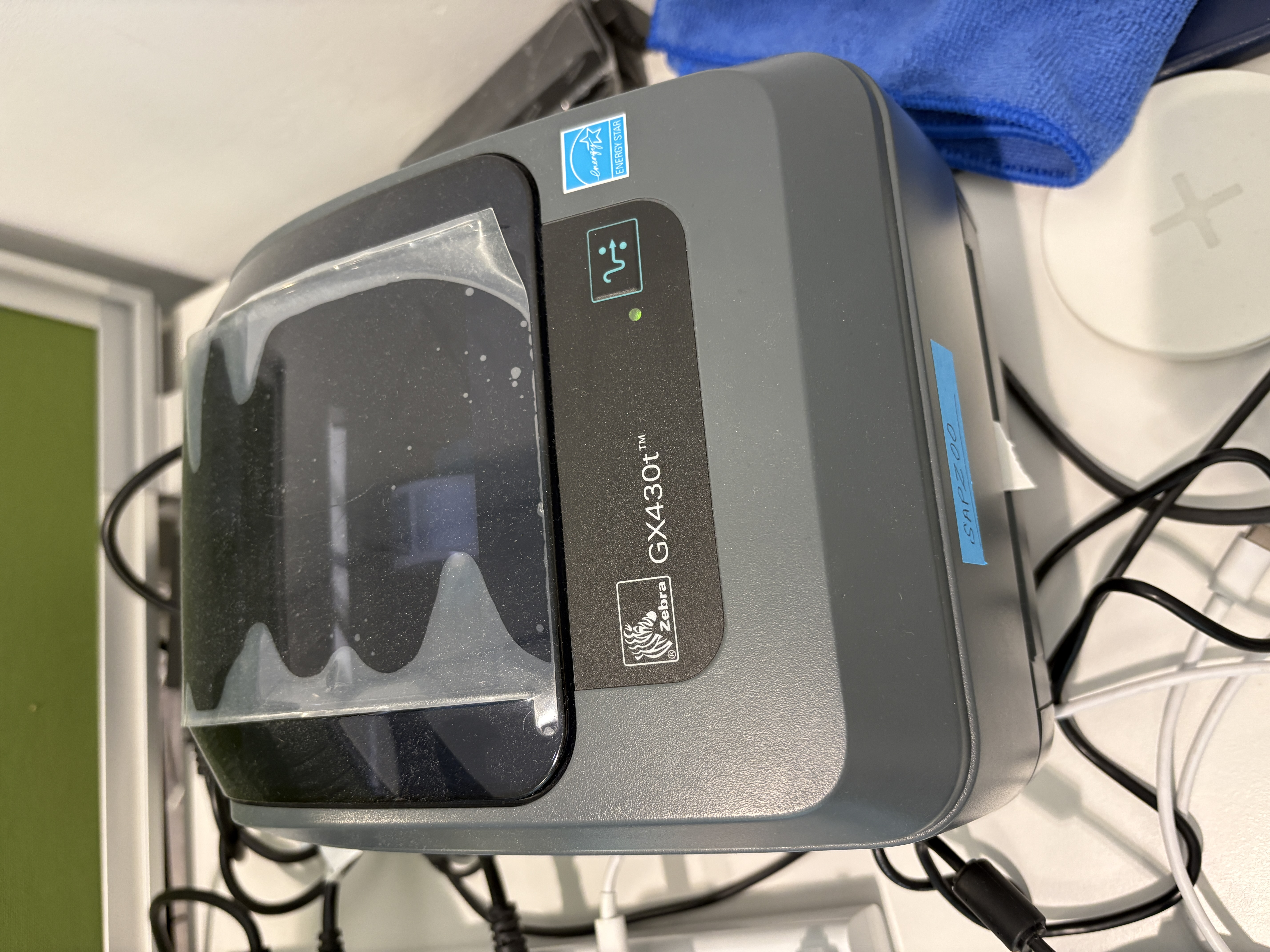
This is our actual unit, still in service at the IT desk. Every IT asset that has left our office in the last three years carries a label that came out of this printer.
Why Zebra? The Industry Credentials

Zebra isn't just another hardware vendor. The numbers explain why enterprise IT teams around the world trust them:
| Stat | What It Means |
|---|---|
| 80%+ of Fortune 500 companies work with Zebra | Your peers are already using this ecosystem |
| #1 global leader in thermal printing, barcode scanning, rugged mobile computing, RFID readers and retail task management software | Industry-standard, not niche |
| 56+ years dedicated to frontline operations | This is all they do — not a side product |
"Tap into the world's foundation for intelligent operations and discover countless ways to make your most critical workflows faster, simpler and more efficient. The result? Better experiences for your employees and the customers they serve every day." — Zebra Technologies
At the Riyadh office, we are part of that 80%+ — and the reliability speaks for itself. The GX430t has been printing every working day for 3 years without a single hardware failure.
What the GX430t Does for Us
The Zebra GX430t prints QR code asset tags for every piece of IT equipment we manage:
- Laptops and MacBooks
- iPhones and iPads
- Monitors and peripherals
- Access Points (APs) and wireless infrastructure
- Network switches and routers
- Server room equipment — rack units, patch panels, power units
- Any other IT hardware that needs tracking
Every device gets a label before it leaves the IT desk. No label = not tracked.
Why QR Codes, Not Just Barcodes
QR codes give us far more flexibility than traditional barcodes:
- Mobile scanning — any phone camera can read them, no dedicated scanner required
- CLEA app integration — our custom asset lifecycle app auto-scans QR codes to update asset status directly
- Hand scanner support — dedicated QR/barcode scanners for bulk stock operations
- More data density — a QR code can encode the full Equipment Number + Serial Number in one scan
- Durability — QR codes remain readable even when partially damaged (error correction built-in)
The Asset Tagging Workflow
This is the end-to-end process we follow for every asset:
1. Device arrives (procurement or return)
New device is unpacked and staged at the IT desk. ServiceNow ticket is raised.
2. Asset record created
Equipment Number and Serial Number entered into the asset management system.
3. QR label printed on GX430t
Label is printed with the Equipment Number, Serial Number, and a QR code encoding both. Takes under 10 seconds.
4. Label applied
Clean the device surface with an alcohol wipe. Apply the label in the standard position:
- Laptops: bottom panel, near the serial number
- Phones/iPads: back cover, bottom corner
- Network devices: front panel or top surface
- Server room equipment: front bezel or side panel
5. QR code verified
Scan the label with the CLEA app or hand scanner to confirm the QR code reads the correct data.
6. Asset status updated
CLEA app or hand scanner updates the asset record — status changes from Received to In Stock or Assigned.
Scanning in the Field
Once labels are applied, the QR codes are used throughout the asset lifecycle:
CLEA App (Mobile):
- Open CLEA app on iPhone or iPad
- Point camera at QR code on device
- Asset record opens instantly — view or update status, assigned user, location
Hand Scanner:
- Used for bulk stock takes — scan 50+ items in minutes
- Auto-populates asset fields in the system
- Connects to the IT asset management system via API
Direct IT Link Center Scanning:
- When a user brings a device to the IT desk, scan the QR code to pull up the record immediately
- No manual searching by serial number — one scan shows everything
GX430t Setup Notes
The GX430t is simpler to set up than the ZT411 — no RFID calibration required. Key setup steps:
- Media loading: lift the top cover, thread the label roll through the guides, close the cover
- Self-calibration: press the feed button to run auto-calibration — the printer detects label size automatically
- Driver installation: install Zebra Setup Utilities, add the printer via USB or network
- Label template: configure the ZPL template for the required format (Equipment No. + Serial + QR code)
- Test print: print one test label, verify QR code scans correctly before going live
Connection: we use USB for direct connection at the IT desk. The printer has been running on the same USB cable for 3 years without issue.
3 Years of Operation — What We Learned
What works well:
- Direct thermal printing is fast and reliable — no ribbon changes needed
- QR codes have proven more durable than barcodes on our label stock
- The GX430t is compact — fits on any desk without taking up space
- CLEA app integration turned manual asset updates into a 3-second scan operation
What to watch:
- Label roll alignment is critical — if the roll shifts, the QR code prints off-centre and may not scan
- Clean the printhead monthly — dust buildup causes faded prints that fail QR scans
- Use the correct label stock — cheap generic labels peel off; use Zebra-certified media for permanent adhesion
GX430t vs ZT411 — When to Use Which
| Feature | GX430t | ZT411 |
|---|---|---|
| Print type | Direct thermal (no ribbon) | Thermal transfer (ribbon required) |
| RFID | No | Yes — UHF RFID encoder built-in |
| Speed | Fast | Industrial speed |
| Label type | QR / barcode | QR / barcode + RFID inlay |
| Best for | Desktop, moderate volume | High volume, RFID tagging |
| Setup complexity | Simple | Requires RFID calibration |
| Use at IT desk | All QR asset tags | RFID asset tags (new programme) |
Both printers serve different purposes. The GX430t handles all QR code labelling. The ZT411 adds RFID capability for the global RFID programme. Together they cover every asset tagging requirement in our IT operation.
References
- Zebra GX430t User Guide (PDF)
- IT Asset Management Workflow — Riyadh office
- CLEA App — IT Asset Lifecycle Operations
- IT KB1349678 — RFID Label Printing & Labelling Guide